cpanel Optimization
https://engintron.com/ – nginx fro WHM/cpanel
https://my.bluehost.com/cgi/help/2521
https://nixcp.com/free-cpanel-plugins/
https://engintron.com/ – nginx fro WHM/cpanel
https://my.bluehost.com/cgi/help/2521
https://nixcp.com/free-cpanel-plugins/
First access the server command line. I used SSH over Putty (http://www.chiark.greenend.org.uk/~sgtatham/putty/) But you can use the terminal/console if supported by your host, ftp or winSCP (https://winscp.net/eng/docs/guide_install) which may be easier. then access the file /etc/ips.remotedns For SSH I used the command: nano /etc/ips.remotedns you will need to know the nameservers for your domain I…
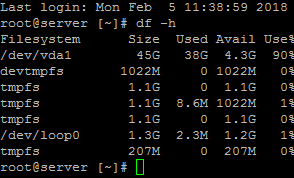
ttp://www.wikihow.com/Find-a-File-in-Linux find / -type f -iname “<file you want to find>” Examples find / -type f -iname “libphp5.so” find / -type d -iname “ibdata1” find / -type f -iname “*arcconf” grep -R ‘AllowNoPassword’ / egrep ‘User’ /etc/apache2/apache2.conf grep DocumentRoot /etc/apache2/apache2.conf To find files larger than 100MB, use this command: find / -type f -size +100000k…
Unfortunately due to the limited availability of IP addresses sometimes they are re-used from sources that have been black listed in the past. Generally blacklists are updated within 30 days of an IP not being reported for spam. However many services like Microsoft, Google, Yahoo and others, have taken to using their own systems…
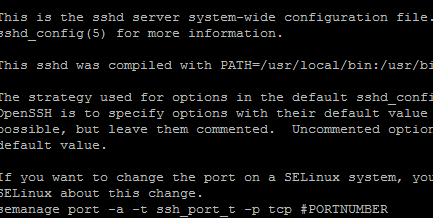
You can set your SSH port through the command line by editing the ssh configuration file ( /etc/ssh/sshd_config ) with this command. Note: if you are runnning a firewall on the server you will want to open the desired port before proceeding. nano /etc/ssh/sshd_config You can now edit the configuration file. It will start something…
Warning the following guide will teach you how to completely delete files from your server. This needs to be run as root so be EXTRA careful before running any command and double check the files that you delete, these will be non-recoverable. If you are working on a small VPS it is not uncommon to…
Optimizing an Entry Level WHM/Cpanel VPS Server https://my.bluehost.com/cgi/help/2521 How To Enable GZIP Compression In cPanel WHM https://nixcp.com/free-cpanel-plugins/